How to Let Your Team Chat with Business Data in WhatsApp
To let a team chat with business data in WhatsApp, connect a self-hosted AI agent gateway like OpenClaw to your backend databases using read-only connectors, source citations, and strict per-user permissions.
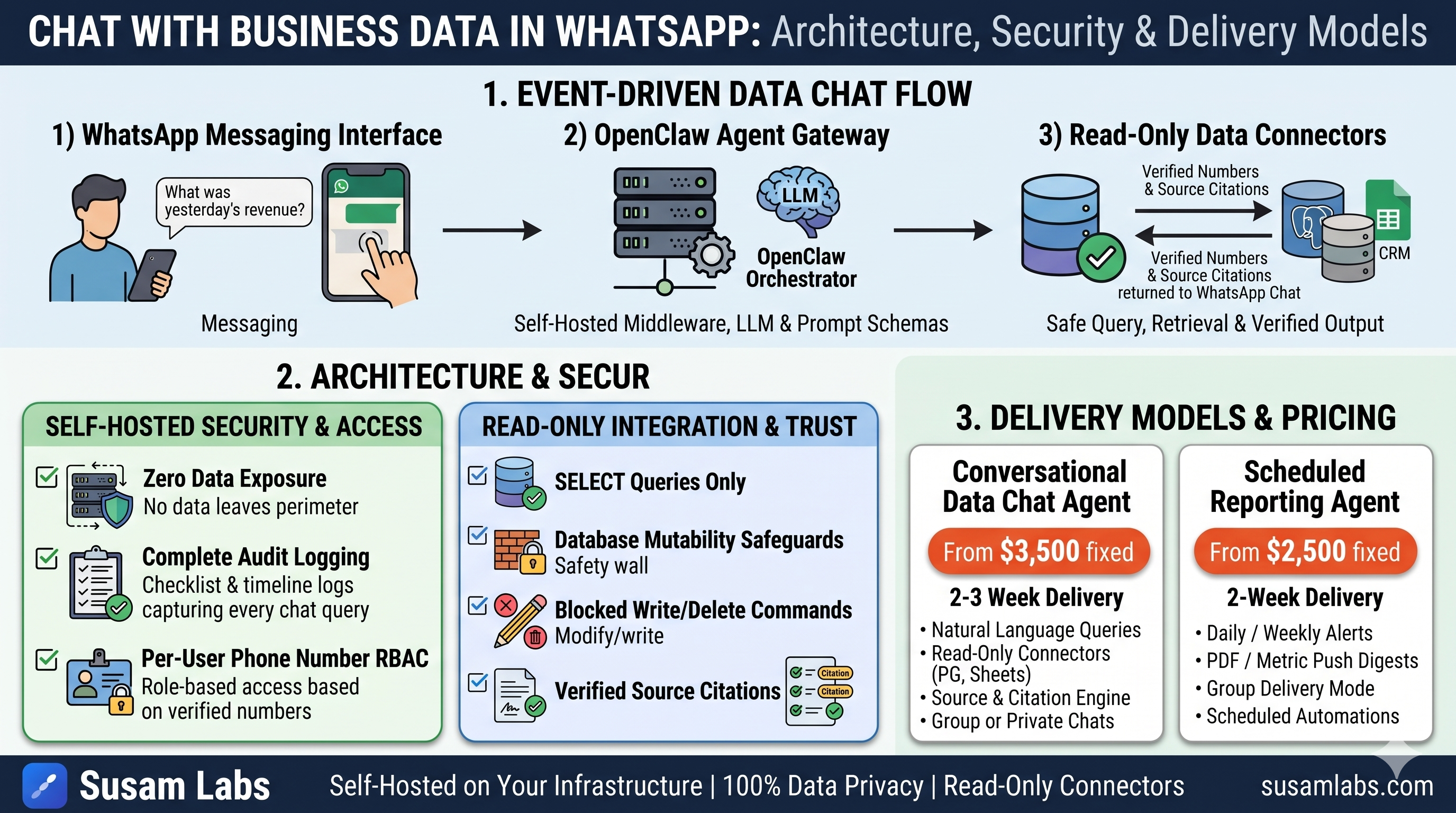
To let a team chat with business data inside WhatsApp, you deploy a self-hosted AI agent gateway—such as OpenClaw—that connects WhatsApp to your internal databases, spreadsheets, and CRM through read-only integrations. When a team member asks a question in a WhatsApp chat thread, the agent parses the query, executes a read-only database or API call against your backend systems, and returns a plain-language answer complete with source record citations.
For small and medium-sized businesses, valuable operational data is often scattered across four different software tools and stored in a few key employees' heads. Setting up an agent to chat with data whatsapp workflows allows non-technical field workers, sales reps, and managers to query live operational numbers directly from the messaging app they already use every day.
Direct Answer: How WhatsApp Business Data Chat Works
Enabling your team to query business data directly inside WhatsApp requires three primary components:
- A Messaging Interface: A connected WhatsApp channel operating via the official WhatsApp Business API.
- An Agent Gateway: A middleware application—such as OpenClaw—that receives WhatsApp webhooks, passes prompts to a large language model (LLM), and coordinates tool execution.
- Data Connectors: Secured, read-only connections into your operational systems (PostgreSQL databases, Google Sheets, SQL servers, or CRMs).
When a user sends a message such as "What were yesterday's revenue numbers for the eastern region?", the agent gateway intercepts the message. It resolves the natural language request into a structured database query or API call, runs the query against the backend system, verifies the retrieved figures, and formats the response back into the WhatsApp thread.
Crucially, every answer provided by the agent includes a citation pointing directly to the underlying source record. This ensures that team members can verify numbers against native systems whenever necessary, eliminating hallucinated or unsupported assertions.
The Architecture: Why OpenClaw and Self-Hosting Matter
Many off-the-shelf AI chat software options require uploading company data or passing sensitive database credentials through external cloud services. For most businesses, sending proprietary financial records, customer details, or operational logs to third-party vendors creates unnecessary security and compliance risks.
To solve this, Susam Labs builds conversational WhatsApp workflows using OpenClaw. OpenClaw is an open-source, self-hosted AI agent gateway designed specifically to connect messaging channels like WhatsApp to internal business tools and data sources.
Core Benefits of a Self-Hosted Agent Architecture
A self-hosted AI gateway ensures that your proprietary business data never leaves your own controlled infrastructure.
Running an agent on your own infrastructure provides significant operational advantages:
- Zero Data Exposure: Queries and retrieved business records remain within your cloud environment or local servers.
- Complete Audit Logging: Every question asked, query executed, and response generated is captured in a centralized audit log.
- No Vendor Lock-In: Because the agent relies on open-source frameworks and runs on your own infrastructure, you maintain full ownership of the system code, workflows, and credentials.
If you ever discontinue external engineering support, the entire agent setup remains running on your systems without interruption or subscription dependencies.
Connecting to Your Data Safely: Read-Only Connectors
Allowing an automated AI model to interact with operational databases requires strict technical boundaries. The primary rule when implementing chat-with-data workflows is restricting the agent exclusively to read-only data access.
How Read-Only Access Protects Systems
When connecting OpenClaw to your database, spreadsheets, or CRM, database users and API keys are granted explicit read-only permissions.
- Data Mutability Safeguards: The agent cannot issue UPDATE, INSERT, or DELETE SQL commands, preventing accidental record modification or deletion.
- Structured Schema Mapping: The agent reads predefined database views or specific CRM endpoints rather than scanning raw, unindexed production tables.
- Deterministic Query Generation: The LLM translates incoming natural language questions into safe SELECT queries or REST API GET calls based on strict context schemas.
If a user asks for information that requires updating a record, the agent explicitly clarifies that it operates in read-only mode and directs the user to the appropriate internal tool or manual process.
Security and Per-User Access Control
In a team environment, not every employee should have access to every piece of business data. A field service worker inquiring about daily job schedules should not necessarily view executive payroll figures or high-level company profit margins.
To maintain organizational security, the agent enforces per-user permissions matching the access levels users already hold inside native systems.
Enforcing User Identity in WhatsApp
- Phone Number Mapping: The agent maps incoming WhatsApp phone numbers against verified employee profiles in your CRM or identity directory.
- Permission Checkpoints: Before executing a database query, the agent evaluates whether the requesting user profile possesses clearance for the target data scope.
- Filtered Record Returns: If a query spans restricted tables or fields, the agent strips sensitive fields or declines the query entirely based on configured security rules.
By enforcing role-based access control, businesses can deploy a single WhatsApp agent across multi-departmental teams without risking data leaks across operational tiers.
Deploying a Data Chat Agent: Scope, Costs, and Ownership
Implementing a conversational data agent is best executed as a productised, fixed-scope engineering engagement rather than an open-ended custom development project. Through our AI automation services, Susam Labs delivers production-ready WhatsApp agents with predictable pricing and clear launch timelines.
Implementation Options and Fixed Pricing
Depending on your team's operational needs, two primary deployment models exist:
- WhatsApp Conversational Data Agent: A full conversational agent built on OpenClaw with read-only connectors to your database, sheets, and CRM. Includes source record citations, per-user permissions, and full audit logging. Fixed price starting at $3,500, delivered in 2 to 3 weeks.
- WhatsApp Reporting Agent: A lighter-weight agent built on OpenClaw that pulls metrics on a schedule (daily, weekly, or month-end summaries) and posts plain-language reports directly to WhatsApp threads, while supporting basic ad-hoc queries. Fixed price starting at $2,500, delivered in 2 weeks.
Note that third-party WhatsApp Business API usage fees charged by messaging providers are billed separately based on message volume.
The Delivery Framework
Our engineering delivery process follows three distinct stages:
- Week 0 - Call and Scope: We conduct a 30-minute technical evaluation to define data sources and user access requirements, delivering a one-page spec with a fixed price, fixed timeline, and firm launch date.
- Weeks 1–3 - Fixed-Scope Build: We build and test the OpenClaw agent, configure read-only database connectors, establish prompt schemas, and integrate WhatsApp webhooks with weekly progress demos.
- Launch and Handover: We deploy the system directly to your infrastructure, hand over all source code, credentials, and runbooks, and remain reachable for 30 days of post-launch support at zero additional cost.
If your team requires custom workflow architecture or needs to discuss specific database integrations before starting, you can schedule a technical scoping discussion via our contact page.
Step-by-Step: Getting Your Data Ready for WhatsApp
If you plan to introduce a WhatsApp data chat agent to your organization, preparing your data infrastructure beforehand accelerates deployment:
- Document Primary Questions: List the top 10 to 15 questions your team routinely asks daily (e.g., inventory checks, order statuses, daily revenue totals).
- Consolidate Data Schemas: Identify which systems host the authoritative records for those questions, whether in SQL databases, Google Sheets, or CRM platforms.
- Define Access Matrix: Map out which team roles or phone numbers should receive permission to query each specific dataset.
- Isolate Read-Only Credentials: Create dedicated read-only database users or API service keys specifically for the AI agent gateway.
Key Takeaway
Letting your team chat with business data in WhatsApp replaces manual status calls and scattered reporting with instant, verified queries. By grounding an open-source gateway like OpenClaw with read-only data access, source citations, and strict role-based security, you give your team immediate access to figures without sacrificing data integrity or security.
Common questions
- How much does a WhatsApp data chat agent cost?
- A conversational agent that answers questions about your business data in WhatsApp starts at $3,500 fixed from Susam Labs and ships in 2 to 3 weeks. WhatsApp Business API usage fees are billed separately by your messaging provider.
- Is business data safe when using WhatsApp AI agents?
- Yes. OpenClaw runs on your own infrastructure so data never leaves your environment. The agent uses read-only connectors, enforces per-user permissions, and keeps a full audit log of every question asked.
- Do we own the agent and workflows after build?
- Yes. OpenClaw agents run on your infrastructure and n8n workflows run in your instance. Susam Labs hands over all source code, credentials, and a written runbook with no vendor lock-in or ongoing hosting dependencies.