How to Put a Human Approval Step Inside an Automated Workflow
To put a human approval step inside an automated workflow, persist execution state, dispatch context to an active communication channel, pause execution on a wait node or webhook listener, and handle timeouts cleanly.
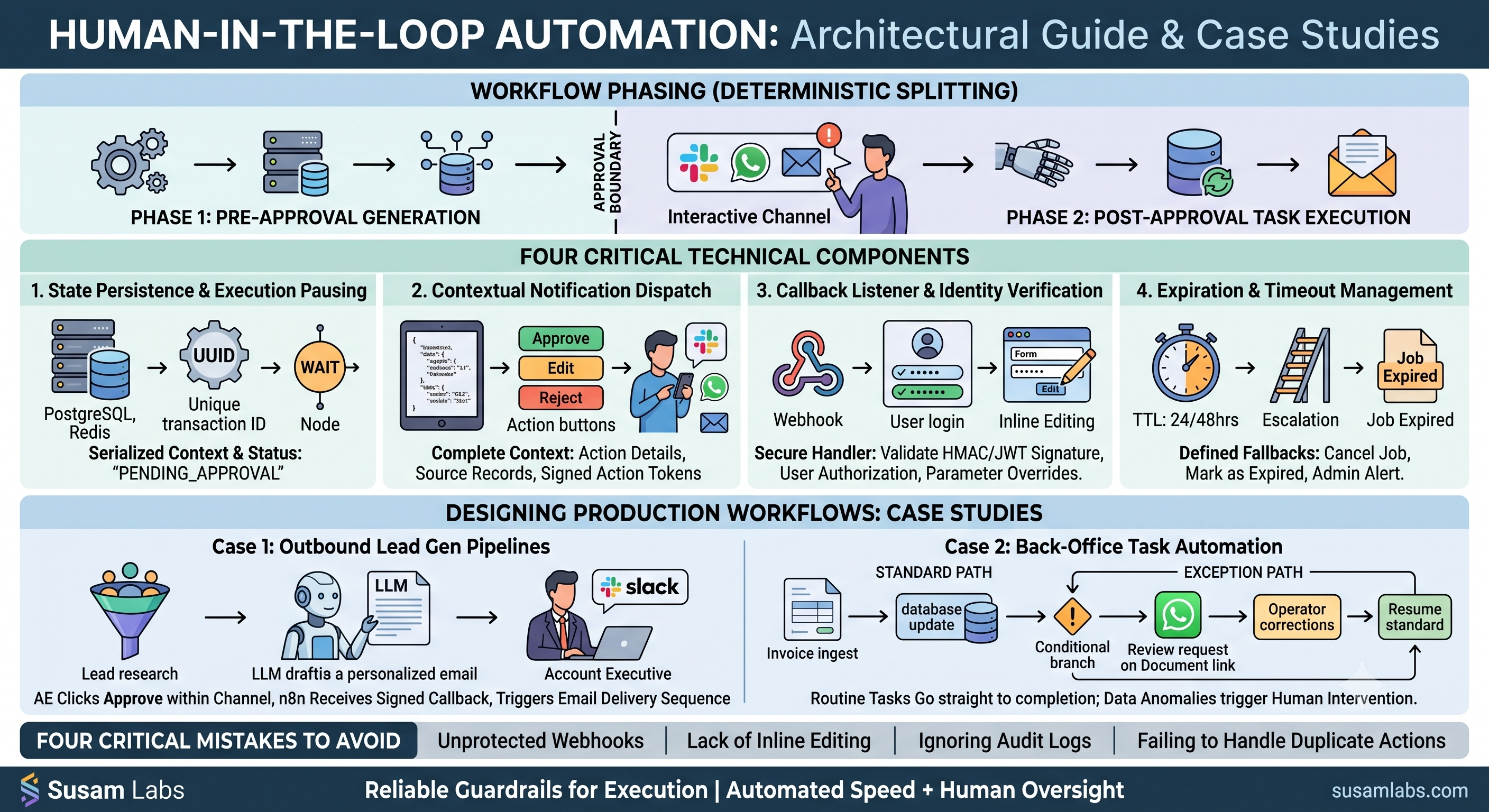
Placing a human approval step inside an automated workflow requires splitting execution into two deterministic phases: pre-approval payload generation and post-approval task execution. Between these two phases, the orchestrator persists state, dispatches an interactive notification to a channel operators actively check (such as Slack, WhatsApp, or email), and enters a paused state. The workflow resumes execution only when a valid, signed callback payload arrives via a webhook endpoint or API request.
This pattern, known as human in the loop automation, guarantees that high-stakes actions—such as dispatching outbound sales emails, approving financial reconciliations, or updating core database records—remain subject to manual sign-off while retaining the speed and efficiency of automated upstream data gathering.
The Technical Architecture of an Approval Gate
Implementing a production-grade human approval step relies on four fundamental technical components regardless of whether you build on an open-source engine like n8n or a custom orchestrator.
1. State Persistence and Execution Pausing
When an automated process reaches an approval boundary, the execution state must be serialized and stored securely. In workflow platforms like n8n, this is handled via native Wait nodes that pause execution until an incoming webhook request satisfies the node trigger. In custom code pipelines, the orchestrator writes the current payload context, process metadata, and a unique transaction ID to a persistent datastore (such as PostgreSQL or Redis), setting the status to pending_approval before pausing the job.
2. Contextual Notification Dispatch An approval gate fails operationally if human reviewers do not have sufficient context to make an informed decision quickly. Rather than sending a generic alert that forces an operator to switch contexts and log into three different dashboards, the system formats the collected data into a structured payload containing:
- The proposed action (e.g., exact text of an email, transfer amount, or updated customer record).
- Relevant context and source records (e.g., firmographic data, confidence scores, or verification checks).
- Explicit action buttons or deep links containing signed action tokens.
These notifications are dispatched to channels teams already monitor. For instance, teams running messaging workflows might use self-hosted gateways like OpenClaw to send summary reports directly into WhatsApp threads, while engineering and ops teams often route approval triggers to designated Slack channels.
3. Callback Listener and Identity Verification When an operator clicks Approve, Reject, or submits an edit, the client interface sends a request back to a designated webhook endpoint. Secure approval handlers validate three core elements:
- Cryptographic Signature: A single-use, timed token (e.g., HMAC or JWT) ensuring the callback cannot be forged or replayed.
- User Authorization: Audit logging confirming the identity of the human operator who authorized the action.
- Modified Parameters: If the interface allows inline edits (such as tweaking an LLM-generated cold email draft before sending), the payload overrides the original draft parameters before downstream execution resumes.
4. Expiration and Timeout Management Automated workflows cannot pause indefinitely. Stale approvals lead to out-of-date execution context, duplicate reviews, or orphaned process runs. A complete implementation defines clear timeout behaviors:
- Time-to-Live (TTL): Automatically expire approval tokens after a set duration (e.g., 24 or 48 hours).
- Fallback Execution: Define explicit rules for expired runs, such as cancelling the execution, marking the job as expired in the database, or sending an escalation alert to an admin queue.
Designing Approval Steps in Production Workflows
At Susam Labs, we build AI-native products and agentic workflow automation on n8n and OpenClaw across our AI automation services. Placing human checkpoints at the right boundaries determines whether an automated system survives real-world operational use.
Case 1: Outbound Lead Generation Pipelines In automated outbound prospecting engines, an n8n workflow executes initial list building, verifies contact deliverability, runs a per-prospect research pass against live company sites, and drafts a personalized initial email using an LLM.
Before any email reaches an outbound queue, the process routes through an explicit human-in-the-loop approval queue:
- The workflow generates the draft and posts the prospect summary, research notes, and draft text into a review channel.
- The account executive clicks Approve directly within the notification, or opens a lightweight form to edit the first line.
- Upon approval, n8n receives the callback payload and triggers the email delivery sequence via API.
This pattern allows teams to maintain complete control over messaging quality while automating 90% of the manual research workload. Production lead generation workflows with built-in approval queues are available starting at $4,200 fixed.
Case 2: Exception Routing in Back-Office Task Automation For back-office work like invoice processing, report generation, or onboarding checklists, the goal is high-throughput automation. However, data anomalies require human intervention.
In an n8n back-office workflow (which starts at $1,800 fixed for process mapping and implementation), conditional branching routes routine runs straight to completion, while edge cases trigger human review:
- Standard Path: Ingest file -> Extract data -> Evaluate business rules -> Execute database update.
- Exception Path: If validation confidence drops below a specified threshold or a value exceeds preset limits, the workflow pauses, logs an alert, and dispatches a review request containing the raw document link and extracted fields to an operator.
Once the operator corrects or verifies the payload via the review interface, the workflow resumes execution along the standard path.
Four Critical Mistakes to Avoid
- Unprotected Webhook Endpoints: Exposing raw, unauthenticated callback URLs allows anyone who guesses the URL structure to trigger downstream actions. Always sign approval links with short-lived tokens.
- Lack of Inline Editing: Forcing an operator to choose strictly between binary approve/reject options often leads to high rejection rates. Providing a simple form to correct minor errors inline keeps the workflow moving.
- Ignoring Audit Logs: Operating without a detailed log of who approved what action—and what data was modified during the sign-off step—creates severe compliance and debugging challenges.
- Failing to Handle Duplicate Actions: If two managers receive the same approval alert simultaneously, the system must handle the race condition so that the second click gracefully informs the user that the action was already completed.
Practical Takeaway
Implementing a human approval step is not about slowing down automation; it is about building reliable guardrails for execution. By persisting state safely, dispatching actionable context into active channels, and securing callback handlers, you get the speed of automated data processing alongside human oversight.
To discuss how to structure production-ready agentic workflows or n8n automations for your organization, review our options on the Susam Labs services page or reach out directly through our contact page.
Common questions
- How does a human approval step work in n8n?
- In n8n, execution pauses using a Wait node configured to listen for an incoming webhook call. The workflow sends an alert with a unique callback link to Slack or email and resumes execution only when the reviewer submits sign-off.
- What happens if an approval request is ignored?
- Well-designed workflows set a time-to-live (TTL) on approval steps. If unhandled within a set window (e.g., 24 hours), the workflow automatically cancels the run, triggers an admin alert, or routes to an escalation path.
- Can human operators edit data during the approval step?
- Yes. Approval interfaces can include form fields or text inputs. When submitted, the callback payload sends the modified JSON data back to the orchestrator, which uses the updated values for downstream execution.
- How much does it cost to build human-in-the-loop workflows with Susam Labs?
- Productised n8n task automations with human alerting start at $1,800 fixed, while full outbound lead-generation engines with approval queues start at $4,200 fixed.